Microsoft & Atlassian: The Perfect Synergy for Modern Teams


Do you know this? Important tasks arise in the Teams chat and then disappear again. Decisions are made in meetings and nowhere recorded. Documents lie somewhere in SharePoint – but no one knows where anymore. This is not a Microsoft problem and not an Atlassian problem. This is an integration problem. And it can be solved.

In this article you will learn…
- Why Microsoft tools alone reach their limits for structured project management and knowledge management
- Which specific integrations exist between Microsoft 365 and the Atlassian toolset (Jira, Confluence)
- Which use cases are solved by these integrations – from task management to absence planning
- What matters during implementation to ensure the integration really works in everyday life
Why integration is crucial
In today's digital working world, companies face a central challenge: Microsoft is established. Teams, SharePoint, Outlook – these tools are deeply rooted in most organizations, often historically grown and hardly imaginable without. And for good reason: they cover communication, file storage, and basic collaboration solidly.
But when it comes to structured project and task management as well as sustainable knowledge management, the Microsoft ecosystem quickly reaches its limits. Information disappears in email threads, decisions are not documented, and knowledge remains in individual heads instead of the company – distributed across OneNote notebooks, SharePoint pages, and Teams channels that no one systematically maintains.
The weaknesses of the Microsoft ecosystem
Project management: Well-intentioned but fragmented
Microsoft Planner sounds promising but often remains superficial in practice. It lacks depth for more complex projects: no mature dependencies between tasks, hardly any reporting options, limited automations. Microsoft Project, on the other hand, is powerful – but for many teams too complex, too expensive, and insufficiently integrated into the modern workday. The result: teams resort to Excel lists that no one keeps up to date or email threads that quickly become confusing.
Knowledge management: Information that no one finds
OneNote is a digital notebook – practical for personal notes but not a serious knowledge database for teams. Content is hard to structure, barely linkable, and almost unsearchable once the collection grows. SharePoint as an intranet and knowledge database is technically powerful but notoriously complex to maintain. The user interface deters many, the governance effort is high – and in the end, no one knows where the current version of the document is. Knowledge spreads across SharePoint pages, Teams channels, OneNote notebooks, and Outlook emails. The consequence: knowledge is lost, decisions are not documented, and new employees hardly find their way.
Task management: Caught in between
Those who really want to manage tasks in a structured way in a Microsoft environment face a dilemma: To Do, Planner, Project, Loop? Each tool has a different focus, a different target group, and a different integration into the rest of the infrastructure. This leads to silos, duplicate data storage, and frustration – especially in teams that want to work agilely.
What Microsoft does really well
Despite these limitations, there are Microsoft tools that are indispensable in the modern workday:
- Microsoft Teams has become the central communication platform – chats, video calls, channels, all in one place.
- SharePoint offers a solid, scalable foundation as file storage with fine-grained permissions.
- Outlook remains the standard for email and calendar in companies.
- Microsoft 365 overall offers a deeply integrated ecosystem with single sign-on, central user management, and familiar operation.
These strengths should not be given up – they should be complemented with the right tools.
Use cases: Where integration makes the difference
Use Case 1: Manage tasks & projects directly from communication
The problem: An important task arises in a Teams chat or an Outlook email – and vanishes because no one transfers it into a system. Or vice versa: a Jira issue lives isolated in the system, while the actual communication about it is scattered across emails and chats.
The solution: Microsoft 365 for Jira
Microsoft 365 for Jira is available as a bundle, but the individual integrations can also be used selectively and modularly – depending on what is already used in the company and where the greatest need exists.
Outlook → Jira Emails are still a central entry channel for requests – internal and external. With the Outlook integration, emails can be directly converted into Jira issues without copy-paste and without loss of information. Even more important: emails belonging to an existing issue are stored directly on the issue – making them visible to all involved, not just the person in the inbox.
Microsoft Teams → Jira Teams is the communication hub of many companies – and can become even more valuable with Jira. Especially in the context of Jira Service Management (JSM), the integration enables direct customer communication via Teams, without agents or customers having to switch tools. Requests, updates, and feedback flow directly into the JSM issue – the customer communicates in Teams, the agent works in Jira.
Microsoft To Do → Jira Not every task deserves a Jira subtask. Personal task management often happens in To Do – quickly, easily, without project context. With the integration, personal to-do lists can be connected with Jira work items: Jira tasks appear in To Do, and simple tasks can also be recorded as To-Do entries instead of subtasks. Less administrative effort, more flexibility for everyday life.
Outlook Calendar → Jira Appointments related to Jira work items – be it a coordination call, a review, or a deadline check – often have to be coordinated laboriously between tools. With the calendar integration, appointments can be organized directly from the context of a Jira work item without switching tools. Deadlines, sprints, and milestones remain visible in the Outlook calendar, and meetings can be assigned to an issue.

Use Case 2: Link documents & files where work happens
The problem: Documents lie in SharePoint, but work takes place in Confluence – constant back and forth between systems costs time and causes confusion.
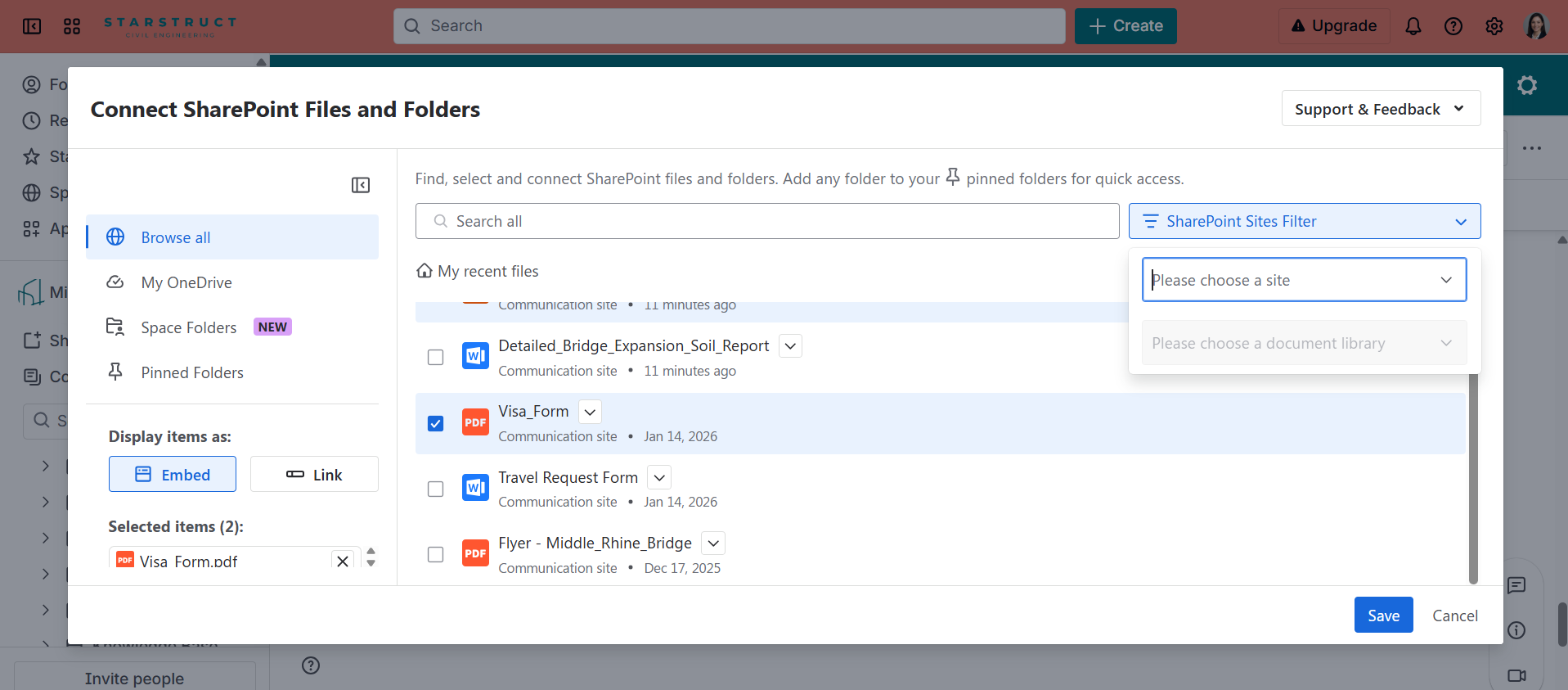
The solution: SharePoint Connector for Confluence
With this connector, SharePoint becomes a seamless part of the Confluence world:
- Embed and display SharePoint files and folders directly in Confluence pages
- Documents remain in SharePoint (including permissions and versioning) but are accessible from Confluence
- No duplicate storage, no outdated copies
Use Case 3: Prepare, conduct, and follow up meetings – structured
The problem: Meetings are planned in Outlook or Teams, notes end up in OneNote or nowhere at all, tasks from meetings are rarely consistently tracked.
The solution: Meetical
Meetical connects the Outlook calendar with Confluence and Jira:
- Create meeting agendas directly from the calendar in Confluence
- Store minutes structured in Confluence and link them with the calendar event
- Automatically create tasks from meetings as Jira work items
The result: Meetings have clear preparation and follow-up, decisions are documented, and action items end up where they are worked on.

Use Case 4: Make absences visible – without manual maintenance
The problem: Someone is on vacation, but this is nowhere indicated in Jira. Tasks are assigned, sprints planned – without knowing who is available when.
The solution: Out of Office Sync for Jira and Microsoft
- Outlook absences (vacation, illness, home office) are automatically synchronized with Jira
- Team availability is immediately visible during sprint planning
- No more manual maintenance in two systems

Conclusion: Both toolsets need each other
Microsoft and Atlassian are not competitors – they are complementary. Microsoft provides the infrastructure for communication, identity management, and file storage. Atlassian provides the depth for project management, knowledge building, and structured collaboration.
The question is not either or – but how well are the two worlds connected?
A well-implemented integration means:
- No system breaks – users work in the tool they know, and data flows automatically where it is needed.
- Clear responsibilities – communication in Teams, tasks in Jira, knowledge in Confluence, files in SharePoint.
- Higher acceptance – because no one has to jump between five tools to complete a simple process.
Setting up these integrations is not a given. Establishing the technical connection is often the easier part – the real challenge lies in change management, clear process definitions, and ensuring all involved understand which tool is for what.
This is exactly where we support. From needs analysis through technical implementation to accompanying the introduction in the team – we ensure that Microsoft and Atlassian really work together in your company.
Interested? Contact us – we'll look together at which integrations bring the greatest added value for your setup.
FAQ
Do we have to implement all integrations at once? No – and we don't recommend it either. Most integrations are modular and can be introduced step by step. It makes sense to start with the use case that solves the biggest pain or affects the largest user group.
What happens with permissions? Does everyone suddenly see everything? No. The integrations respect existing permissions in both systems. If someone does not have access to a document in SharePoint, they will not see it via Confluence either.
How long does a typical implementation take? That depends on the scope. A single integration like Out of Office Sync can be set up in a few hours. A complete integration of multiple tools including process definition and training typically takes several weeks. We will gladly provide you with a realistic estimate for your setup.
Do we need external support or can we do it ourselves? Technically, many integrations are well documented and basically implementable by yourselves. Experience shows, however, that the real effort is not in the technical setup – but in process design, team communication, and sustainable adoption. This is exactly where external support is most valuable.




.webp)


