Incident Management with Jira Service Management



From Ticket Chaos to Structured Outage Resolution
Modern incident management stands on three pillars: intelligent ticket intake via dynamic portals, a dedicated workflow for major incidents, and automated alerting via Opsgenie. Whoever cleanly connects these three elements in Jira Service Management shortens recovery time and relieves first-level support from manual preliminary work.
Concretely, this means:
- Dynamic forms in the customer portal ask only the relevant fields, depending on the outage category.
- A separate major-incident workflow automatically informs stakeholders and creates clear responsibilities during the acute phase.
- Opsgenie routes alerts from monitoring to the responsible on-call person, including escalation levels.
As an Atlassian Platinum Solution Partner in Switzerland, Swarmit accompanies IT organizations in exactly this implementation, from the first portal structure to the run-on call service.
Where incident management fails in practice
The most common cause of poor incident management is not the lack of a tool, but the lack of structure. Tickets end up in a generic queue, contain too little context, and first-level spends the first ten minutes just trying to understand what it's about. Then questions are asked back, the ticket is manually moved to the responsible group, and sometime during this process the actual work begins.
An incident is by definition an unplanned interruption of a service. The goal is always the same: restore the service as quickly as possible. Anything that shortens this path is worthwhile. Anything that lengthens it should be put under review.
In the engagements we accompany with Swiss customers, we see three recurring patterns: unclear ticket intake, no defined procedure for major incidents, and alerts that land in the wrong inbox. All three points can be addressed in Jira Service Management (JSM).
Intelligent ticket intake with dynamic portals
A portal is only used if it helps the employee faster than a call to IT. To achieve that, two things are needed: a manageable category structure and forms that adapt depending on the selection.
Concretely: If someone selects "Application not working," the form asks for the affected application and automatically loads related knowledge articles. If someone selects "Access lost," it's about username and system, not screenshots. This is not cosmetic. This is the difference between a ticket that can be processed immediately and one where the agent has to ask three follow-up questions.
In JSM we implement this with Request Types and conditional fields. The category structure remains deliberately lean: in practice we see that more top-level categories tend to decrease usage rather than increase it. Whoever tries to offer everything becomes a search engine that nobody uses.
In this blog Anja gives further insights on the service portal topic: Who builds the service portal and why that is the crucial question
The major-incident workflow: When it really burns
A major incident is different from a normal incident. Usually multiple business services are affected, time is critical, and several people work in parallel. Using the same workflow in this situation as for a forgotten password wastes time.
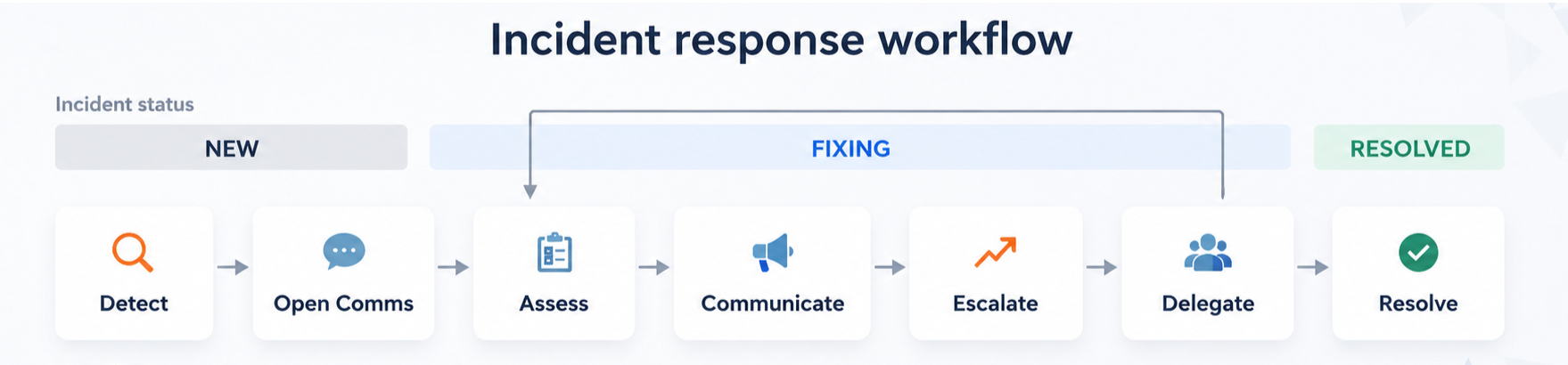
We recommend a dedicated major-incident workflow with four elements:
- Automatic notification of defined stakeholder groups (Business, Communications, Executive Management) when switching to major status.
- A fixed communication pattern that is maintained within the ticket itself, not distributed across Teams or Slack.
- Automatic creation of a post-incident review after closure.
The switch to major status is made at the push of a button from the normal incident ticket. The prerequisite is that the criteria are defined beforehand: When does an incident become a major incident? We clarify this question with the customer at the start and record it as a rule.
On-Call and Alerting: From monitoring directly to the incident
An alert from monitoring is useless if it lands in the wrong inbox. Jira Service Management connects monitoring systems with Incident Management. Incoming alerts are forwarded to the responsible person based on stored on-call or duty rosters and, if necessary, automatically escalated when there is no response.
Two points are decisive when introducing it:
The on-call schedule must reflect reality. Holidays, illness, substitutes or split responsibility between locations must be continuously maintained. An outdated on-call plan causes critical alerts to reach the wrong people or remain unanswered.
Alert thresholds must be set intentionally. A system that constantly alerts creates alert fatigue. It makes sense to start with clearly defined thresholds and gradually optimize them based on operational experience.
Critical alerts can automatically create an incident in Jira Service Management. This turns a monitoring event directly into an incident with clear responsibilities, standardized workflows and full traceability.
Distinction: What incident management is not
Incident management restores the service. It does not determine the root cause. This separation is important because otherwise mixed tickets result: an incident is kept open to search for the root cause even though the service has long been restored.
The rule is simple. If the service is running again, the incident is closed. If a cause remains open, a problem ticket is created and linked to the incident. We will devote a future post in this series to this topic.
Frequently asked questions
What is the difference between Incident and Problem in Jira Service Management? An incident describes the impact: a service is not working as expected. A problem describes the underlying cause. An incident is closed as soon as the service is running again. A problem remains open until the cause is eliminated. Both are represented in JSM as separate issue types and linked to each other.
Is Jira Service Management Standard sufficient?
For many small and medium service teams, JSM Standard is sufficient. It offers ticket management, workflows, automations, and basic reporting. However, if features such as integrated incident management, alerting, on-call/roster schedules, escalations, or advanced service management capabilities are required, JSM Premium or Enterprise is usually the appropriate choice.
How do you measure whether incident management is working? The central metrics are Mean Time to Resolution (MTTR), the share of tickets resolved on first contact (First Contact Resolution), and the share of escalated major incidents. JSM provides these metrics out of the box in reporting.
What is the situation in Switzerland regarding data residency? Atlassian Cloud supports data location Switzerland. For organizations with requirements from the revised Data Protection Act (revDSG) or from regulated environments (FINMA, cantonal regulations), this is the basis for compliant use. Swarmit supports the configuration and documents the data-residency settings auditablely.
Next steps
Anyone who wants to neutrally assess the current state of their incident management will find a good entry point through an assessment: we look at the current ticket structure, review the portal design, and identify the levers with the greatest impact.


.webp)


