Rovo MCP Server simply explained: The backbone of intelligent automation


Developers know the problem: You want to automate workflows and processes, but the path often leads through a dense forest of API endpoints. Tools like UiPath, n8n, or Make enable powerful AI workflow automation or robotic process automation (RPA), but usually only access the Atlassian Cloud via the REST API. This brings limitations and challenges. This is exactly where the Rovo MCP Server comes in.
The Rovo MCP Server is a standardized interface based on the Model Context Protocol (MCP). It acts as an intelligent mediator between the Atlassian Cloud platform and AI models like ChatGPT, automation tools like UiPath, or other external services.
This standardized connection enables the AI not only to understand and generate text but also to specifically perform actions in Atlassian apps: for example, searching Jira issues, creating reports, writing stories, or generating test cases. This opens up completely new possibilities for intelligent automation within the Atlassian ecosystem.
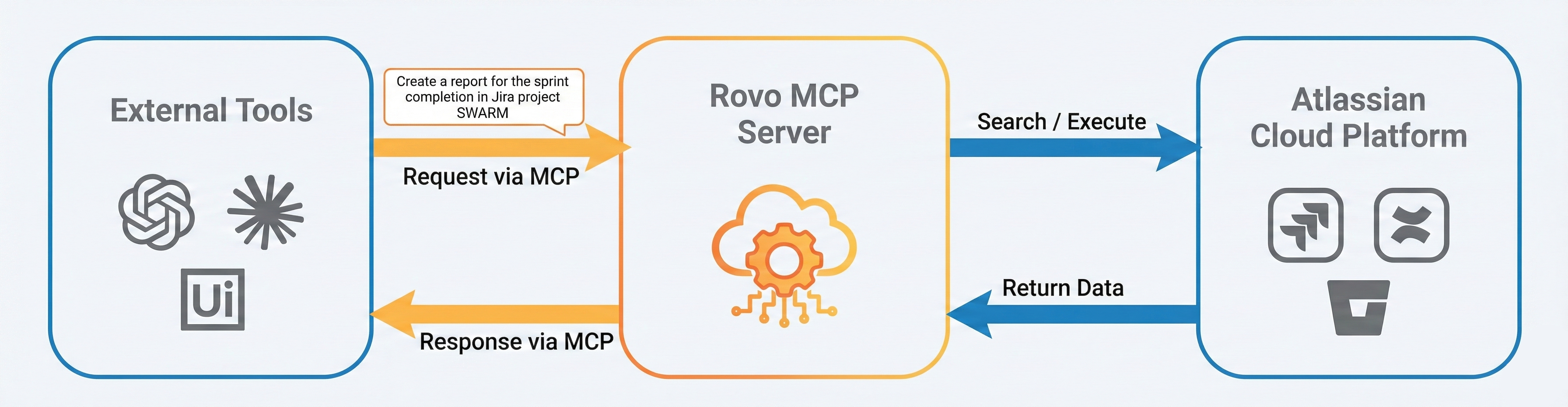
The architecture of the Model Context Protocol (MCP)
The architecture of the Model Context Protocol (MCP) is designed to enable secure, standardized communication between AI language models and enterprise systems such as the Atlassian Cloud. The protocol separates the language logic from the system logic by acting as a mediator.
The Rovo MCP Server implements this architecture to transform natural language requests like "Create a report for the sprint completion in Jira project SWARM" into secure, traceable actions. This creates a scalable, auditable, and privacy-compliant integration between automation platforms and Atlassian apps: a crucial foundation for secure AI automation in enterprises.
How the Rovo MCP Server ensures security and data protection
A core question remains as always: security and data protection.
The Rovo MCP Server relies on OAuth 2.1 for authentication, ensuring that only authorized users can access their Atlassian account via a secure, browser-based login. Specific scopes are requested, which the user must approve before use. This way, the MCP Server only has access to the data and actions for which the user actually has permissions.
All connections between MCP client and server are encrypted via HTTPS (TLS 1.2 or higher) to reliably protect data during transmission. Additionally, OAuth session management ensures that access tokens are only valid for a limited time and are regularly renewed.
As a resource server, the MCP Server checks with every request whether the access token is valid, contains the correct permissions, and was issued for exactly this server. This reliably prevents unauthorized or manipulated access.
Thanks to these proven security mechanisms, the Rovo MCP Server offers a high level of data protection, access control, and integrity: without developers having to implement their own complex authentication logic.
Rovo MCP Server integrations: These tools can already be connected today
Since the Rovo MCP Server is currently still in beta, only a limited number of tools and platforms are supported by default.
Nevertheless, the MCP Server already offers deep integrations for important AI and automation tools:
- OpenAI’s ChatGPT: Integrated in Chat, Deep Research, and Agent Mode in the Team Plan.
- Claude by Anthropic: Supports Claude Desktop, Claude for Teams, and Claude Code.
- Google Gemini CLI: Supported for connection with local or remote MCP Server.
- Microsoft: Integrated in M365 and Azure OpenAI scenarios.
Other supported tools:
- Amazon Quick Suite
- Visual Studio Code
- Cursor
- GitHub Copilot
- Loveable.dev
- HubSpot
- Figma Make
- Zapier
- Google Vertex AI
Practical example: How to set up the Rovo MCP Server in Visual Studio
For the tools supported by Atlassian, the connection to the Rovo MCP Server can be established quickly and easily. A practical example is Visual Studio Code: Atlassian provides a special extension in the store.
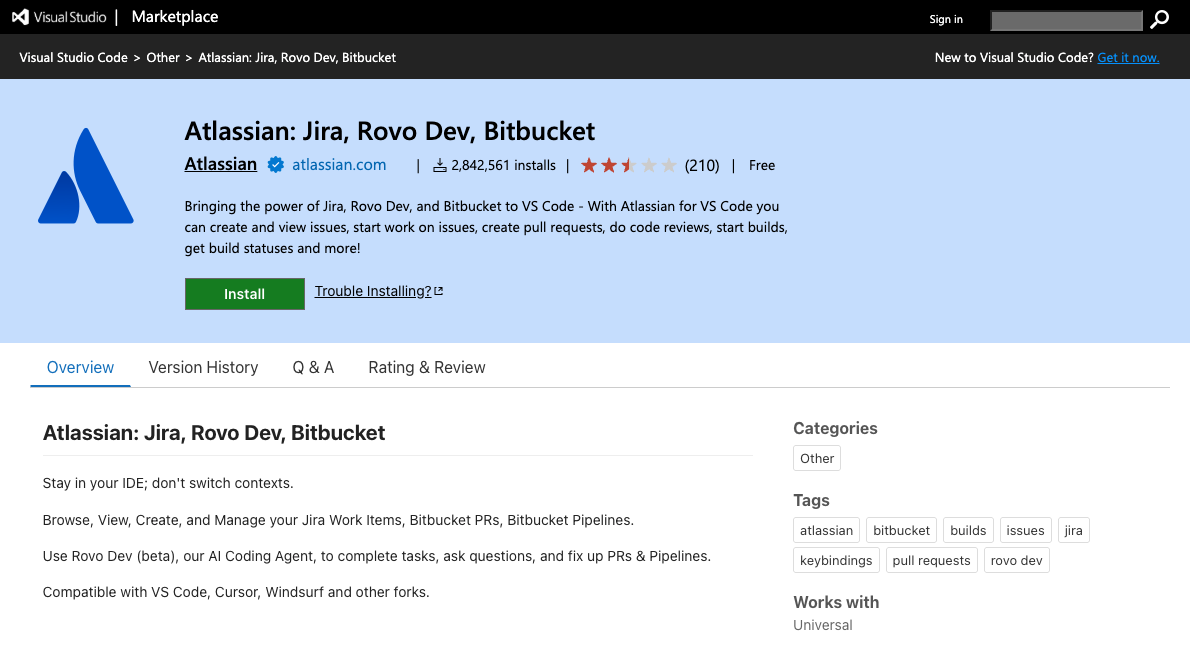
After installation, users can log in directly with their Atlassian account and activate the connection to the Rovo MCP Server.

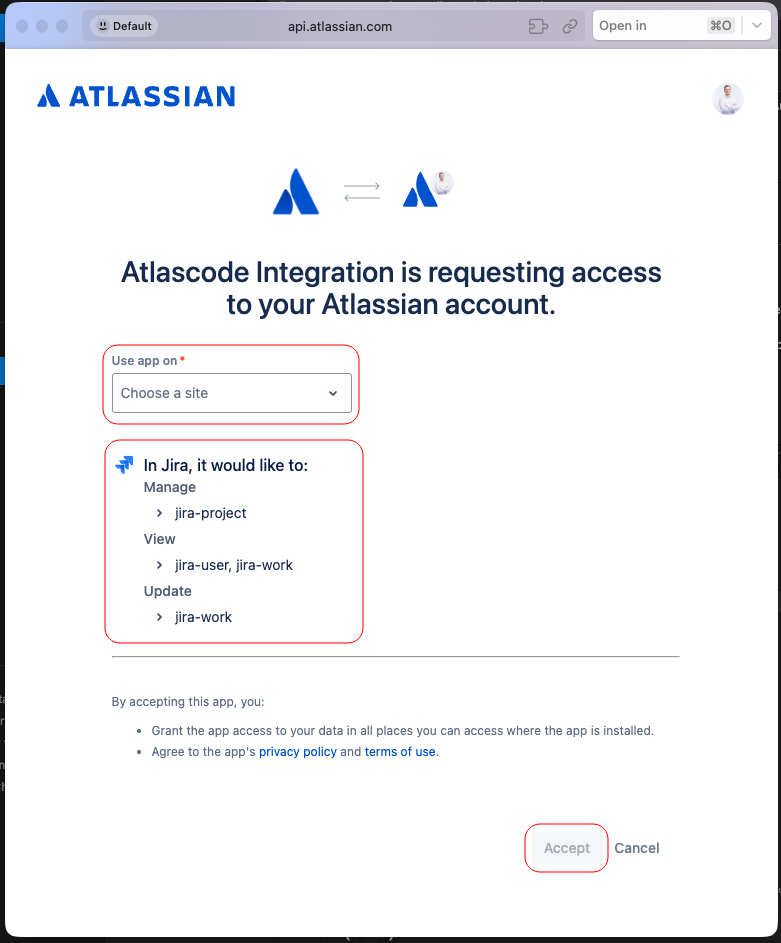
When this action is performed, a browser window opens with the Atlassian authentication screen. There, the user selects the cloud site to which access should be granted and then confirms the authentication. At the same time, all permissions granted to the MCP client are displayed in the screen, so it is clearly traceable which rights are granted.
Not officially supported? How to integrate additional tools with MCP anyway
Thanks to the Model Context Protocol (MCP), additional external tools can be easily integrated with the Rovo MCP Server. Through the standardized Model Context Protocol, Atlassian supports the connection of all tools that can set up a local MCP client and establish a secure connection to the Rovo MCP Server via an MCP remote proxy.
A practical example is UiPath:
Developers can create local MCP servers with the UiPath MCP SDK, which register with the UiPath Orchestrator. These MCP servers can then be securely c
In this way, UiPath automations can be seamlessly deployed and flexibly access the Atlassian Cloud platform. This enables efficient AI and workflow integration and expands the possibilities for intelligent automation in the enterprise environment.
Ready for secure AI automation in Jira & Confluence?
The Rovo MCP Server offers companies a standardized, secure, and flexible solution to seamlessly connect AI models and automation tools with Atlassian apps. From OAuth 2.1 authentication through encrypted data transmission to locally based integration of external tools: the Rovo MCP Server ensures data protection and permission management.
If you also want to professionally and securely implement the integration of AI and process automation in the Atlassian Cloud, we at Swarmit, as an experienced Atlassian partner in Switzerland, are here to provide comprehensive consulting.
➡ Contact us today and find out how Rovo can efficiently extend your Atlassian tools.


.webp)


